Welcome to Stratos
Sign in, find your way around the interface, and know where to go next.
Stratos is the platform you use to manage your digital signage: upload content, design layouts, schedule what plays on which screens, and keep an eye on every screen’s health, from anywhere.
Signing in
Section titled “Signing in”- Open your Stratos address in a browser. Your administrator will have given it to you.
- Click Sign in and enter your email and password on the secure sign-in page.
- If you’ve turned on two-factor authentication, enter the code from your authenticator app.
- You land on the Dashboard.
New here? Ask a workspace admin to invite you. You’ll get an email with a link to set up your sign-in. Forgotten your password? Use the forgot-password link on the sign-in page, or ask an admin to send you a temporary one. See Security.
The layout of the interface
Section titled “The layout of the interface”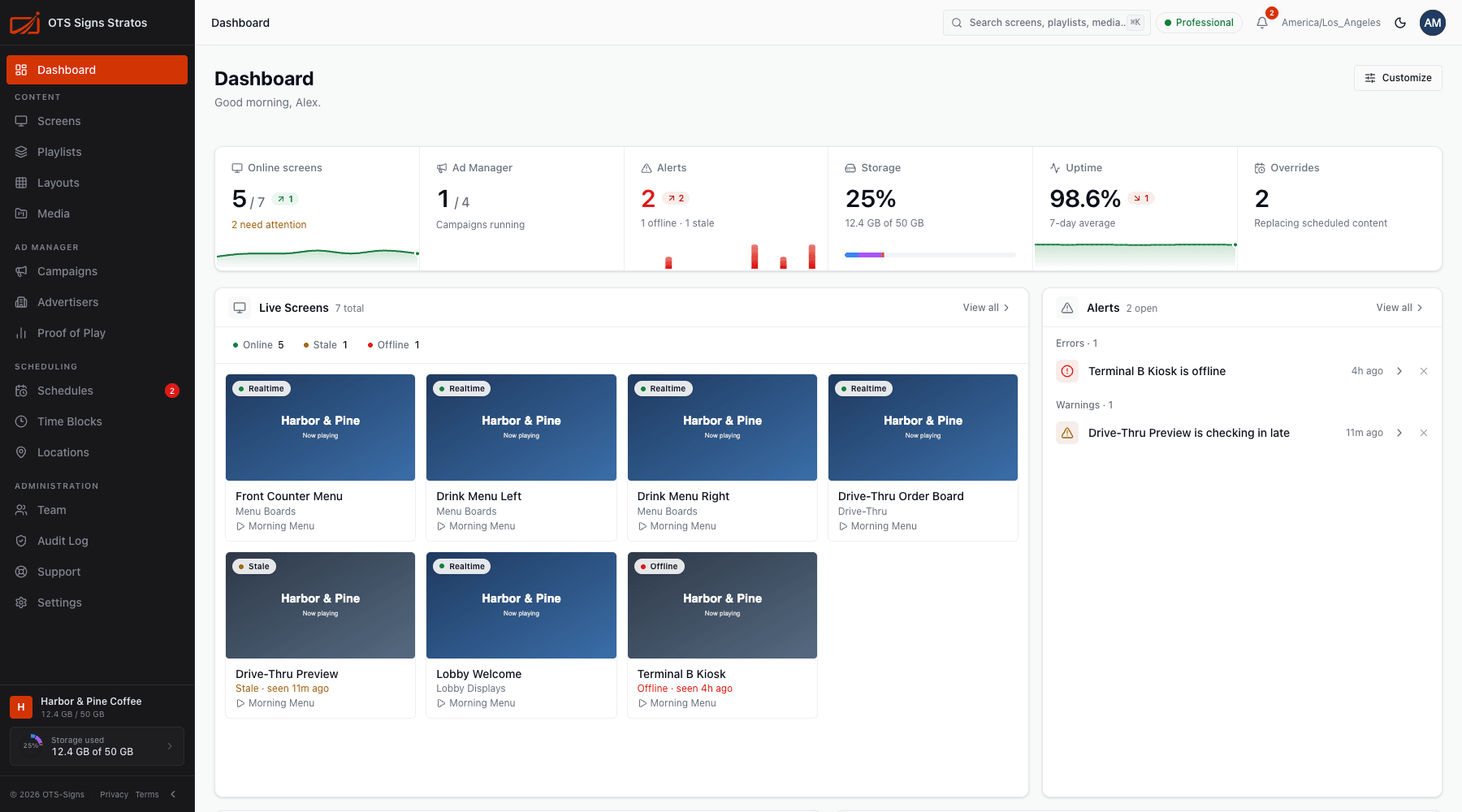
The sidebar
Section titled “The sidebar”Navigation is grouped by what you’re doing. You only see the areas your role allows.
| Group | Pages |
|---|---|
| Dashboard | Your overview. |
| Content | Screens, Playlists, Layouts, Media. |
| Ad Manager | Campaigns, Advertisers, Proof of Play (a plan feature). |
| Scheduling | Schedules, Time Blocks, Locations. |
| Administration | Team, Audit Log, Support, Settings. |
At the bottom is your workspace name and a Storage used gauge. Collapse the sidebar to icons with the arrow button. On a phone or small window it slides in from the menu button.
The top bar
Section titled “The top bar”- Breadcrumbs show where you are.
- Search: opens the command palette. Press ⌘ K (Ctrl K on Windows).
- Plan indicator: your current plan or trial status. See Plans & Subscription.
- Bell: offline and stale screens and announcements. See Screen Health.
- Time zone you’re viewing times in.
- Theme toggle: light or dark.
- Your avatar: My Account, Settings, About and Sign out.

The help button
Section titled “The help button”The round ? button at the bottom right opens Help Center, Support and Report a Bug. See Help Mode.
Where to go next
Section titled “Where to go next”New to Stratos? Follow Your First 5 Minutes. Then:
- Learn the vocabulary: Core Concepts.
- Tour the dashboard: Navigating the Dashboard.
- Work faster: Search & Command Palette and Keyboard Shortcuts.
- Take Stratos on the go: The Mobile App.